> For the complete documentation index, see [llms.txt](https://docs.spara.com/llms.txt). Markdown versions of documentation pages are available by appending `.md` to page URLs; this page is available as [Markdown](https://docs.spara.com/build/knowledge.md).
# Knowledge
How to train Spara agents on your company's knowledge base.
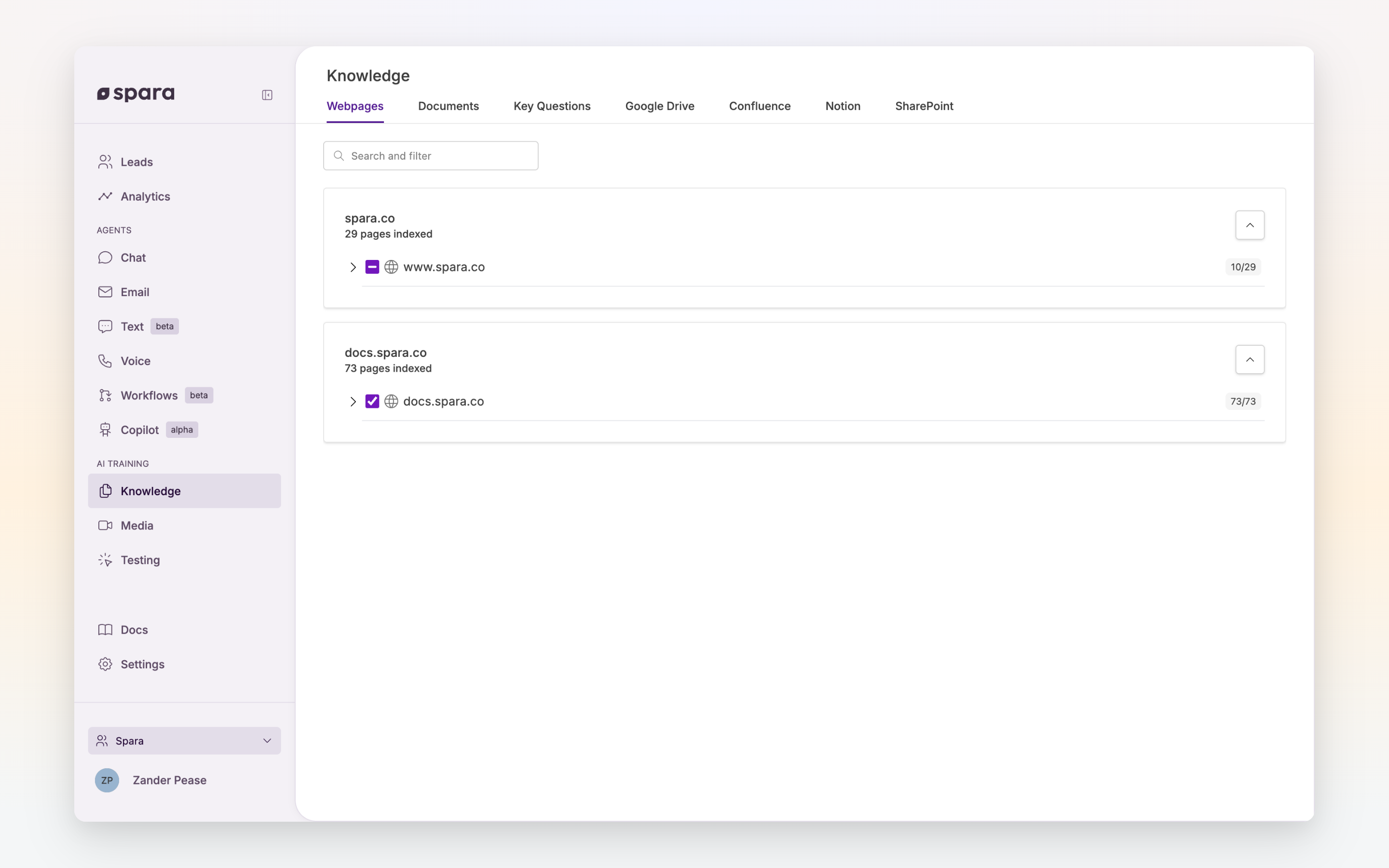
Spara agents are trained on your company's knowledge base — product information, marketing content, and key talking points. The [Knowledge page](https://app.spara.co/knowledge) is where you manage all of the sources your agents use to answer lead questions accurately.
The Knowledge page showing indexed webpages and documents.
Knowledge is different from your agent's prompt. The prompt defines *how* the agent behaves; knowledge defines *what* the agent knows.
## Knowledge Sources
### Webpages
Spara indexes your publicly available marketing website, including multiple subdomains (e.g., your product documentation site). This is where agents learn the bulk of information about your company.
The Webpages tab shows a domain hierarchy of all indexed pages. You can:
* **Toggle training** — Enable or disable individual pages or entire domains. Some pages are off by default because they rarely help an agent: privacy and cookie policies, login pages, tag and category listings, RSS feeds, and site files such as scripts and stylesheets. You can turn any of them back on here.
* **Search** — Find specific pages by URL or content
* **Review content** — View what Spara has indexed from each page
How a page is built affects how much of it Spara can read. If your web team wants to make pages easier for agents to read accurately, see [Developer: Optimizing Your Webpages for Spara Scraping](https://docs.spara.com/developers/optimizing-your-webpages-for-spara-scraping).
### Documents
Upload files for Spara to learn from. Supported formats:
* PDF
* DOCX
* Markdown
Maximum file size is 25MB. Documents can be uploaded via drag-and-drop or file picker.
Each document can be set to **For training** (active) or **Archived** (excluded from agent knowledge). Use filters to find documents by file type, status, or last updated date.
Spara also supports syncing documents from external platforms:
* [Google Drive](/integrations/document-sync-integrations/google-drive.md)
* [Confluence](/integrations/document-sync-integrations/confluence.md)
* [Notion](/integrations/document-sync-integrations/notion.md)
* [Sharepoint](/integrations/document-sync-integrations/sharepoint.md)
## FAQ
### How do agents use knowledge?
When a lead asks a question, Spara searches across all enabled knowledge sources — webpages and documents — to find relevant information. The agent then incorporates that information into its response, following the tone and rules defined in its prompt.
### Is knowledge shared across all my agents?
Yes. Knowledge is shared across all agents in your organization, and any change to your knowledge base takes effect immediately for every agent.
### How often are webpages re-indexed?
Spara periodically re-crawls your website to keep the knowledge base current. If you need an immediate refresh after a website update, contact your Spara representative.
### Can I see what the agent knows about a topic?
Test your agents on the [Testing](/build/testing.md) page to verify responses in real time.
### What if I upload conflicting information?
Spara uses the most recently updated information. If you notice conflicting answers, review your knowledge sources and update or archive the outdated one.
---
# Agent Instructions
This documentation is published with GitBook. GitBook is the documentation platform designed so that both humans and AI agents can read, navigate, and reason over technical content effectively. Learn more at gitbook.com.
## Querying This Documentation
If you need additional information that is not directly available in this page, you can query the documentation by asking a question.
Perform an HTTP GET request on the following URL with the `ask` and `goal` query parameters:
```
GET https://docs.spara.com/build/knowledge.md?ask=&goal=
```
`ask` is the immediate question: it should be specific, self-contained, and written in natural language.
`goal` is what the user is ultimately trying to achieve, the reason they need the answer. Sharing it helps GitBook give you a better, more relevant answer. A goal is most helpful when it describes the outcome the user wants rather than restating the question. For example, with `ask=how do I create an API token`, a goal like `automate deployments from our CI pipeline` lets GitBook tailor the answer to that use case.
The response will contain a direct answer to the question and relevant excerpts and sources from the documentation.
Use this mechanism when the answer is not explicitly present in the current page, you need clarification or additional context, or you want to retrieve related documentation sections.