> For the complete documentation index, see [llms.txt](https://docs.spara.com/llms.txt). Markdown versions of documentation pages are available by appending `.md` to page URLs; this page is available as [Markdown](https://docs.spara.com/developers/data-model/data-model.md).
# Spara Objects & Fields
The objects Spara stores (Leads, Accounts, Owners, Deals, and Users), the fields on them, and how they map to your CRM.
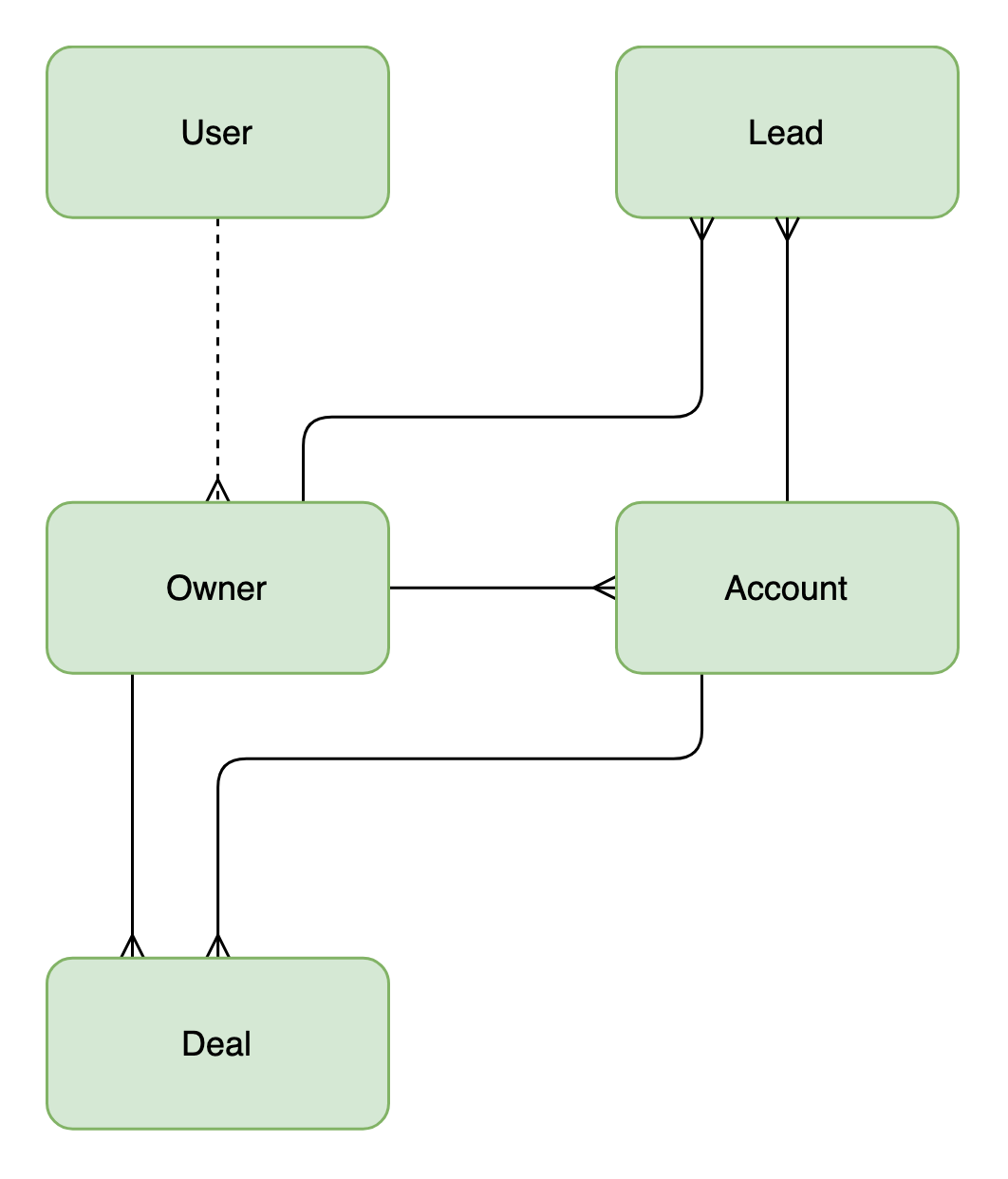
Spara organizes everything it knows about your buyers into five objects. Every API response, every webhook payload, and every record created by a CRM sync is one of these objects or a field on one.
Spara's core objects. A crow's foot marks the "many" side of a relationship, and the dashed line marks an optional link.
Every record belongs to exactly one Spara instance, and API keys are scoped to that instance, so a request never reaches another customer's records.
## Lead
A **Lead** is a single person on the buying side. Leads are the primary resource in the [Web API](/developers/spara-api/web-api.md) and the subject of every [Webhooks](/developers/spara-api/webhooks.md) event.
A Lead is analogous to a HubSpot **Contact**, or to a Salesforce **Lead** and **Contact** together. Spara keeps one record for a person regardless of where they sit in your funnel, so a Salesforce Lead and the Contact it converts into are the same object in Spara.
Leads are created when someone interacts with one of your agents through chat, phone, email, or SMS, when an anonymous visitor is deanonymized, when a CRM record syncs in, when a rep sends an Outbound email to someone new, or when you create one through the API. A Lead belongs to at most one Account and at most one Owner; both are returned inline on the lead object.
For the full list of built-in Lead fields and their API names, see [Lead](/developers/data-model/data-model/lead.md).
## Account
An **Account** is a company. It holds firmographic data such as company name, website, industry, employee count, annual revenue, and billing city, plus any custom account fields you define.
An Account is analogous to a Salesforce **Account** or a HubSpot **Company**.
One Account has many Leads and many Deals, and is assigned to at most one Owner. Accounts arrive through a [CRM integration](https://docs.spara.com/integrations/crm-integrations) or through the Leads API. Spara matches on the CRM record id, so repeated syncs and repeated API calls update the same Account rather than creating duplicates.
Accounts are visible in the app on the [Accounts](https://docs.spara.com/platform/accounts) page. For the full list of Account fields, see [Account](/developers/data-model/data-model/account.md).
## Owner
An **Owner** is the person on your team responsible for a record, typically the account executive who owns the relationship.
An Owner is analogous to the Salesforce **User** a record is assigned to, or to a HubSpot **Owner**.
One Owner has many Leads, many Accounts, and many Deals. The Owner on a Lead is the rep assigned to that person, and the Owner on an Account is the rep assigned to the company. They are usually the same record, but they do not have to be.
An Owner is a data record, not a login. When an Owner's email matches the email of a Spara [User](#user), Spara links the two automatically, which is what connects CRM ownership to the person who signs in to Spara.
Owners are visible in the app on the [Owners](https://docs.spara.com/platform/owners) page. For the full list of Owner fields, see [Owner](/developers/data-model/data-model/owner.md).
## Deal
A **Deal** is an opportunity synced from your CRM: amount, stage, close date, currency, and whether it is open, closed, or won.
A Deal is analogous to a Salesforce **Opportunity** or a HubSpot **Deal**.
Deals belong to an Account and an Owner. Spara also links each Deal to the Leads it engaged, and that link is what produces the influenced pipeline and influenced revenue figures on [Analytics](https://docs.spara.com/platform/analytics).
{% hint style="info" %}
Deals are read-only: Spara syncs them in from your CRM and never creates or edits them. They are not currently exposed through the Web API.
{% endhint %}
## User
A **User** is a person on your team with a Spara login. Users are managed in [**Settings > Team**](https://app.spara.co/organization/team), and they are the only object here that is not buyer-side data.
A User is analogous to a Salesforce or HubSpot **User**, with one difference worth knowing. Salesforce uses a single User object for both seats and record ownership, while Spara splits those roles across User and Owner. That is why the link between them is optional: a rep who owns CRM records but never signs in to Spara exists as an Owner with no User, and an admin who owns no records exists as a User with no Owner.
See [User Management](https://docs.spara.com/platform/settings/user-management) for roles and invitations.
## Fields
Objects carry the relationships; **fields** carry the attributes. A field is a single piece of information stored on a Lead, an Account, or an Owner, such as a job title, an industry, or the answer to a question one of your agents asked.
Fields come from four places: activity Spara captures on its own (page visits, chat and call engagement), answers your agents gather in conversation, values synced from your CRM, and values you send through the API. A field gathered in conversation is a custom field, and it becomes available everywhere built-in fields are, including workflows, personalization, and analytics.
* The catalog of built-in fields lives on each object's page: [Lead](/developers/data-model/data-model/lead.md), [Account](/developers/data-model/data-model/account.md), and [Owner](/developers/data-model/data-model/owner.md).
* To define custom fields, or to see the fields your instance already has, open [**Data Model**](https://app.spara.co/data-model) in the app.
* To map fields to and from your CRM, open a field in [**Data Model**](https://app.spara.co/data-model) and use its CRM sync section. See [CRM Field Mappings](https://docs.spara.com/platform/data-model#crm-field-mappings).
Custom account and owner fields must exist in your Data Model before the API will accept them. For where fields appear in a request or response, see [Web API](/developers/spara-api/web-api.md).
When two sources write the same field, Spara resolves the conflict with a trust hierarchy — a CRM value never gets clobbered by an enrichment vendor, for example. See [#trust-hierarchy](#trust-hierarchy "mention") below.
## Trust Hierarchy
The same field can receive values from several sources: a lead types a phone number into chat, your CRM syncs a different one, and an enrichment vendor suggests a third. Spara resolves these conflicts with a trust hierarchy. Every field value is tagged with the source it came from, and a new value only overwrites the existing one when it comes from a source that is at least as trusted.
From most to least trusted:
| Trust level | What it covers |
| ----------------------------------- | ------------------------------------------------------------------------------------------------------------------------------------------------------------------------------------------------------------------------------------------------- |
| **System-observed** (highest) | Signals Spara's systems observe directly — for example, the caller ID on a phone call, or the visitor's network-derived location (IP country, region, city). |
| **User-confirmed** | Values the lead explicitly confirmed — for example, an email address read back and confirmed during a voice call. |
| **Self-reported & CRM** | What leads tell your agents in conversation, values passed in from your website (URL parameters, webforms, the JavaScript API), values extracted by workflows, and fields synced from your CRM. Self-reported and CRM values are equally trusted. |
| **Third-party enrichment** (lowest) | Values from [lead enrichment](https://docs.spara.com/platform/leads/lead-enrichment) and [deanonymization](https://docs.spara.com/platform/leads/deanonymization) data vendors. |
How conflicts resolve:
* **Equal or higher trust overwrites.** Within the same level, the most recent update wins — so your CRM sync and your agents can both keep a field current.
* **Lower trust never overwrites.** Enrichment fills in fields that are empty, but it never replaces what a lead told your agent or what your CRM synced. The existing value stays in place.
* **Deanonymization stays in its own lane.** Identity guesses from visitor deanonymization are stored in separate, read-only **Deanonymized** fields rather than the primary identity fields, so a vendor's best guess is never confused with data the lead actually provided.
For example: a lead types a phone number into chat (self-reported). If they later call one of your phone numbers, the caller ID (system-observed) replaces the typed value. From then on, neither a conversation nor an enrichment vendor can overwrite it — only another system-observed or more trusted source can.
This is the same hierarchy described in [Trust Hierarchy](https://docs.spara.com/platform/data-model#trust-hierarchy) in the platform documentation.
## FAQ
### Can a Lead belong to more than one Account?
No. A Lead has at most one Account and at most one Owner. A company with several buyers appears as one Account with many Leads.
### Why did a search return two Leads with the same email?
Spara does not merge Leads on email address, so the same person can appear more than once, for example once from a CRM sync and once from a chat conversation. A search by email returns every match, and each has its own id.
### Do I need a CRM integration to get Accounts and Owners?
No. A CRM integration populates them automatically, but you can also create and update both through the Leads API.
### Will syncing the same account twice create duplicates?
No, as long as the CRM record id is included. Spara matches Accounts and Owners on that id and updates the existing record. Without it, Spara updates the Account already linked to the Lead, or creates one if the Lead has none.
---
# Agent Instructions
This documentation is published with GitBook. GitBook is the documentation platform designed so that both humans and AI agents can read, navigate, and reason over technical content effectively. Learn more at gitbook.com.
## Querying This Documentation
If you need additional information that is not directly available in this page, you can query the documentation by asking a question.
Perform an HTTP GET request on the following URL with the `ask` and `goal` query parameters:
```
GET https://docs.spara.com/developers/data-model/data-model.md?ask=&goal=
```
`ask` is the immediate question: it should be specific, self-contained, and written in natural language.
`goal` is what the user is ultimately trying to achieve, the reason they need the answer. Sharing it helps GitBook give you a better, more relevant answer. A goal is most helpful when it describes the outcome the user wants rather than restating the question. For example, with `ask=how do I create an API token`, a goal like `automate deployments from our CI pipeline` lets GitBook tailor the answer to that use case.
The response will contain a direct answer to the question and relevant excerpts and sources from the documentation.
Use this mechanism when the answer is not explicitly present in the current page, you need clarification or additional context, or you want to retrieve related documentation sections.