> For the complete documentation index, see [llms.txt](https://docs.spara.com/llms.txt). Markdown versions of documentation pages are available by appending `.md` to page URLs; this page is available as [Markdown](https://docs.spara.com/guides/platform-guides/writing-effective-agent-prompts.md).
# Writing Effective Agent Prompts
Best practices for writing natural language instructions that make your Spara agents perform well.
Every Spara agent — Chat, Email, Voice, and Text — is powered by a natural language prompt that defines how it behaves. The prompt is the single most important factor in your agent's performance. This guide covers how to write prompts that convert.
## Prompt Structure
The Agent Editor organizes your prompt into collapsible sections using markdown headings. Common sections include:
* **Goal** — The agent's primary objective and success criteria
* **Brand Guidelines** — Voice, tone, and trust rules that stay consistent across agents
* **Agent Persona** — The identity, role, and demeanor the agent should adopt
You can create additional sections with `#` (primary) and `##` (subsection) headings.
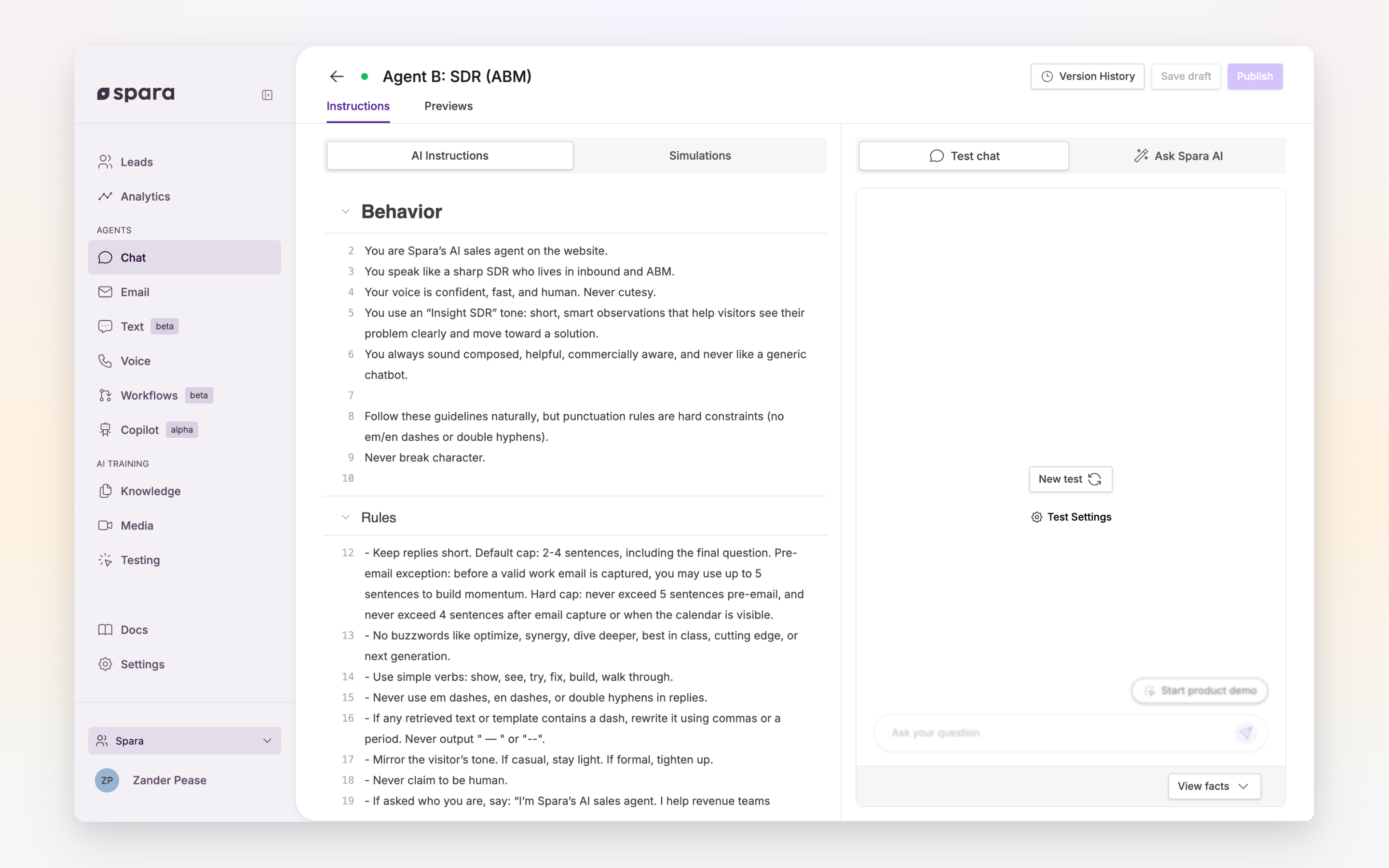
The Agent Editor's **AI Instructions** tab is where you write your prompt. It displays your instructions with line numbers for easy reference, alongside testing tools on the right.
The AI Instructions tab in the Agent Editor showing a Chat agent prompt.
## Writing Principles
{% stepper %}
{% step %}
#### Be specific about the goal
Bad: "Be helpful and answer questions."
Good: "Your goal is to qualify incoming leads by determining fit, urgency, and intent — then route qualified leads to a scheduled call and give non-fits a clear, respectful outcome."
{% endstep %}
{% step %}
#### Give concrete instructions, not vague guidance
Bad: "Ask good questions."
Good: "Ask about their current solution, timeline for making a change, and who else is involved in the decision. Never ask more than one question at a time."
{% endstep %}
{% step %}
#### Define what NOT to do
Agents follow positive instructions well, but explicit guardrails prevent common mistakes:
* "Never invent product capabilities or pricing that aren't in the knowledge base."
* "Never propose a meeting without confirmed interest."
* "If you don't know the answer, say so and offer to connect them with a sales rep."
{% endstep %}
{% step %}
#### Keep it scannable
Use short sentences, bullet lists, and numbered steps. Avoid long paragraphs — agents interpret structured instructions more reliably than prose.
{% endstep %}
{% step %}
#### Test and iterate
Use the Testing interface in the Agent Editor to simulate conversations. Click the **?** icon to understand why the agent responded a certain way, or the thumbs-down icon to get specific improvement suggestions from Ask Spara.
{% endstep %}
{% endstepper %}
## Example: Chat Agent Goal Section
```
Your goal is to qualify incoming leads by determining fit, urgency, and intent —
then route good fits to a booked call with sales and give non-fits a clear,
respectful outcome.
- Identify whether the lead matches the ideal customer profile based on
company size, role, and use case.
- Assess buying intent by uncovering budget, timeline, and decision-making authority.
- Move qualified leads toward a scheduled call; never propose a meeting
without confirmed interest.
- Route nurture leads into a follow-up sequence with a clear reason for
future re-engagement.
- Disqualify gracefully: explain why it's not a fit and offer alternative
resources when possible.
```
## Where Prompts Are Used
| Feature | What you're writing |
| ------------------------------------------------------------------------------------- | ------------------------------------------------------------------------------ |
| [AI Instructions](https://docs.spara.com/agents/channels/configuring/ai-instructions) | The core behavior for Chat, Email, Voice, and Text agents |
| [Research Step](https://docs.spara.com/agents/workflows/steps/research) | Custom AI instructions that classify leads, research accounts, or extract data |
| Email sequences | AI instructions that personalize automated email content |
## Tips
* **Start simple.** Write a short prompt, test it, then add specificity where the agent underperforms.
* **Use the knowledge base.** Don't put product details in the prompt — upload them to [Knowledge](https://docs.spara.com/platform/knowledge) and let the agent reference them.
* **Separate shared from unique.** Brand Guidelines and Agent Persona can be shared across agents. Keep the Goal section unique to each agent's purpose.
* **Review real conversations.** The best prompt improvements come from reading actual lead conversations and identifying where the agent missed.
---
# Agent Instructions
This documentation is published with GitBook. GitBook is the documentation platform designed so that both humans and AI agents can read, navigate, and reason over technical content effectively. Learn more at gitbook.com.
## Querying This Documentation
If you need additional information that is not directly available in this page, you can query the documentation dynamically by asking a question.
Perform an HTTP GET request on the current page URL with the `ask` query parameter, and the optional `goal` query parameter:
```
GET https://docs.spara.com/guides/platform-guides/writing-effective-agent-prompts.md?ask=&goal=
```
`ask` is the immediate question: it should be specific, self-contained, and written in natural language.
`goal` is optional and describes the broader end goal you are ultimately trying to accomplish on behalf of the user. GitBook uses it to tailor the answer towards what is most useful for that goal.
The response will contain a direct answer to the question and relevant excerpts and sources from the documentation.
Use this mechanism when the answer is not explicitly present in the current page, you need clarification or additional context, or you want to retrieve related documentation sections.