> For the complete documentation index, see [llms.txt](https://docs.spara.com/llms.txt). Markdown versions of documentation pages are available by appending `.md` to page URLs; this page is available as [Markdown](https://docs.spara.com/integrations/calendar-integrations/chili-piper-concierge.md).

# Chili Piper Concierge

Spara supports two integration modes for Chili Piper Concierge: an **embedded widget** for Chat agents, and **conversational booking** for Voice agents.

***

## Chat agents: Embedded widget

{% hint style="warning" %}
Chili Piper Concierge's embedded widget provides only partial support for data pre-population, and no support for reading calendar data back into Spara. For Chat agents we generally recommend [Cal.com](/integrations/calendar-integrations/cal.com.md), [Calendly](/integrations/calendar-integrations/calendly.md), or [ChiliCal](/integrations/calendar-integrations/chilical.md), which offer fuller data round-trips.
{% endhint %}

### Data flows

<table data-full-width="true"><thead><tr><th>Spara can prepopulate...</th><th>Spara can read from submitted calendar...</th><th>Integration Notes</th></tr></thead><tbody><tr><td><ul><li>Email</li><li>First name</li><li>Last name</li><li>Company name</li><li>Company size</li></ul></td><td><ul><li>AssigneeID</li></ul></td><td><p>Spara should capture email address before showing a Chili Piper Concierge calendar.</p><p>Spara will prepopulate the calendar form's email field with this info.</p></td></tr></tbody></table>

### How to use Chili Piper with Spara

Spara's AI can intelligently push leads to schedule a call with your sales team.

For example, Spara may be tasked with ascertaining the number of employees at a lead's company. Once discovered, if the lead is at a company with >100 employees, Spara can prompt the lead to schedule a call. If the lead is at a company with <100 employees, Spara can instead prompt the leads towards a self-service sign up flow.

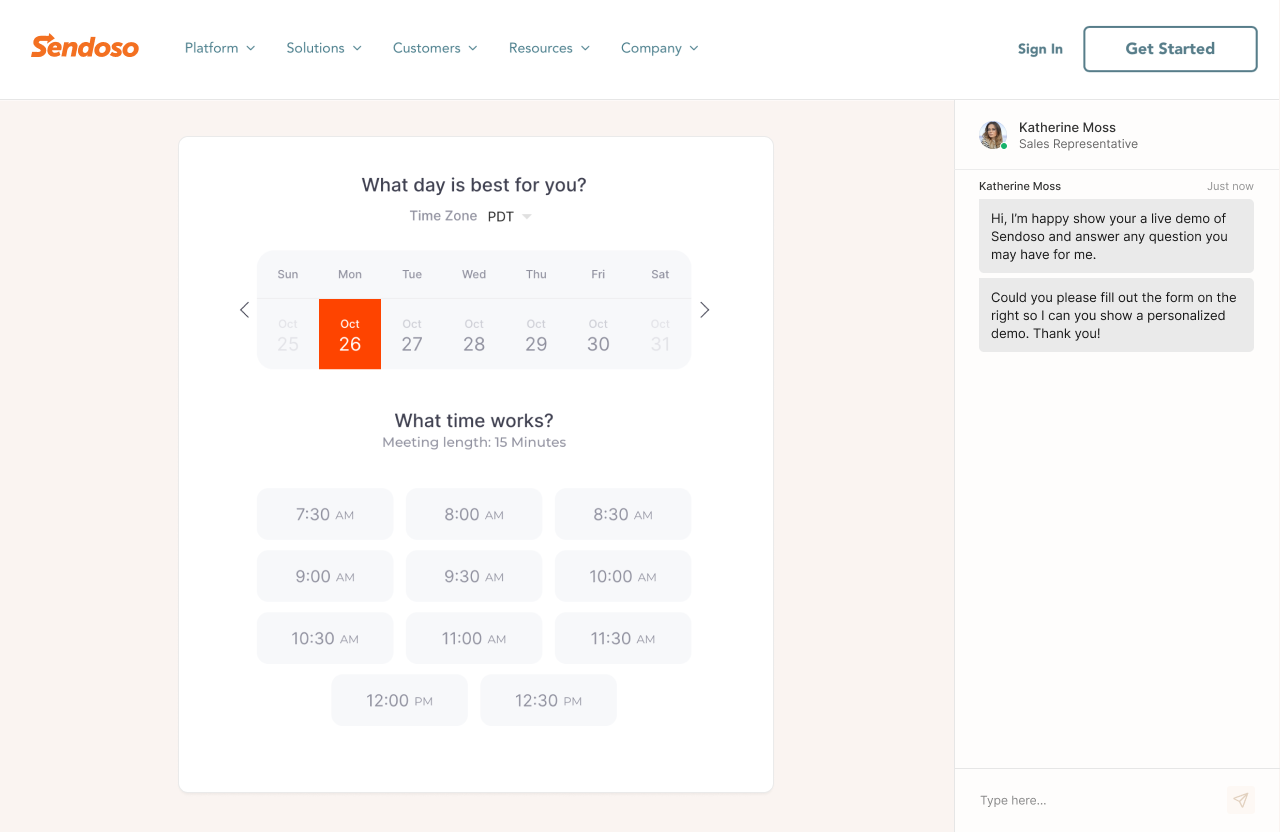
Spara can show a Chili Piper scheduler as part of a conversation. This allows Spara to prequalify a lead before letting them schedule a meeting, or to determine which calendar link to use for each lead.

<figure><img src="/files/Erk2QS06AnT52u0joyQc" alt=""><figcaption></figcaption></figure>

### How to integrate Chili Piper Concierge with Spara

Provide your customer success representative with the url of your Chili Piper Concierge calendar. This will be embedded within Spara's interface.

You will also need to enable Chili Piper's JS API for inbound routing with Concierge. This enables Spara to load your Chili Piper concierge calendar as an embed. Make sure that "Third party form is Submitted" is selected as the trigger.

See Chili Piper's documentation for full instructions: <https://help.chilipiper.com/hc/en-us/articles/32588330506643-Concierge-Snippet-and-JS-API-in-Demand-Conversion-Platform#01J5TW336Q1V1ZR5T6YD4DBB9B>

### Redirecting to a Spara webpage from Chili Piper Concierge

To redirect from a Chili Piper Concierge scheduled to Spara, you will need to set up Chili Piper to redirect to a URL containing form values in the redirect URL. This provides Spara with the information you lead just submitted to Chili Piper.

In the Redirect To settings, select "Enabled" for Include Form Values in Redirect URL - this ensures that Chili Piper includes lead data via query parameters for Spara to ingest. You can then map those query parameters inside the Spara Platform - see our [https://docs.spara.com/developers/spara-api/query-parameters](https://docs.spara.com/developers/spara-api/query-parameters "mention") guide for more information.

<figure><img src="/files/j67DFi0MpNo6bZmlMS7I" alt=""><figcaption><p>How to include query parameters from your Chili Piper redirect</p></figcaption></figure>

***

## Voice agents: Conversational booking

Voice agents can book meetings through Chili Piper Concierge conversationally — the same flow as Calendly or Cal.com. The agent checks availability, reads open slots aloud, and confirms the booking through natural conversation. No embedded widget or browser session is required.

### How it works

1. The Voice agent checks your Chili Piper router for available slots.
2. The agent reads available times aloud (e.g., "I have Tuesday at 2pm or Wednesday at 10am").
3. The lead picks a time conversationally.
4. The agent confirms contact details and books the meeting directly via the Concierge API.

### Setup

On the Voice agent's **Abilities** tab, select **Book meeting** and choose **Chili Piper Concierge** as the calendar provider. You will need:

* **Admin token** — A Chili Piper admin API token for your account.
* **Assignee slug** — The slug of the assignee or team in Chili Piper (e.g. `deputy`).
* **Router slug** — The slug of the routing rule to use for availability and booking.
* **Trigger** — How bookings are submitted. Select **Router Link** for voice-initiated bookings.


---

# Agent Instructions
This documentation is published with GitBook. GitBook is the documentation platform designed so that both humans and AI agents can read, navigate, and reason over technical content effectively. Learn more at gitbook.com.

## Querying This Documentation
If you need additional information that is not directly available in this page, you can query the documentation dynamically by asking a question.

Perform an HTTP GET request on the current page URL with the `ask` query parameter, and the optional `goal` query parameter:

```
GET https://docs.spara.com/integrations/calendar-integrations/chili-piper-concierge.md?ask=<question>&goal=<endgoal>
```

`ask` is the immediate question: it should be specific, self-contained, and written in natural language.
`goal` is optional and describes the broader end goal you are ultimately trying to accomplish on behalf of the user. GitBook uses it to tailor the answer towards what is most useful for that goal.

The response will contain a direct answer to the question and relevant excerpts and sources from the documentation.

Use this mechanism when the answer is not explicitly present in the current page, you need clarification or additional context, or you want to retrieve related documentation sections.
