> For the complete documentation index, see [llms.txt](https://docs.spara.com/llms.txt). Markdown versions of documentation pages are available by appending `.md` to page URLs; this page is available as [Markdown](https://docs.spara.com/integrations/signals/explorium.md).
# Explorium (Lead Enrichment)
Enrich leads with verified contact and company data from Explorium the moment their work email is captured.
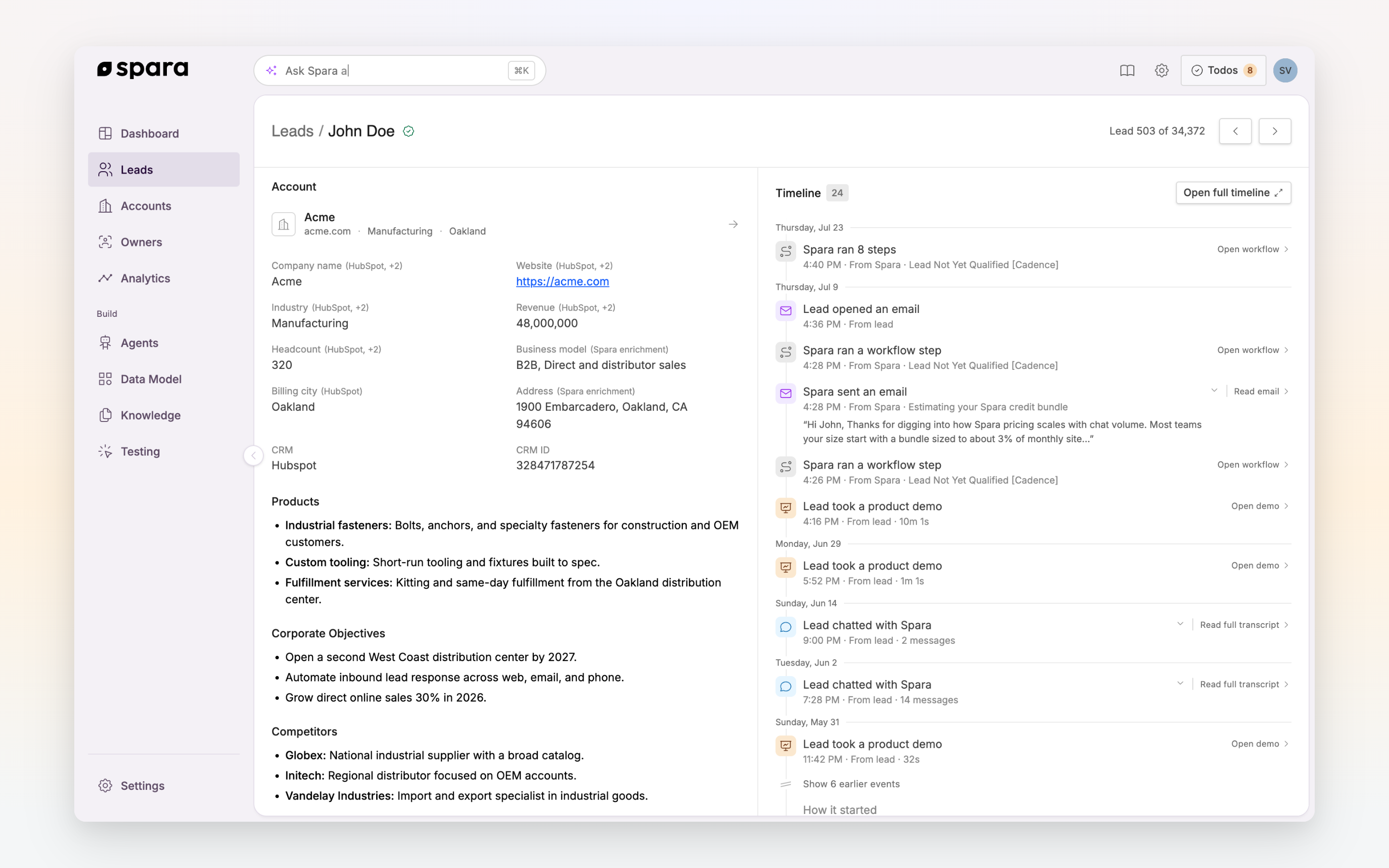
[Explorium](https://www.explorium.ai) is Spara's [Lead Enrichment](/pipeline/leads/lead-enrichment.md) provider. When a lead shares their work email address, whether typed in chat, submitted through a webform, or passed in via query parameters, Spara sends it to Explorium and enriches the lead record with verified contact and company data. Enrichment runs in the background and typically completes within seconds.
Enriched company data in the Account section of the lead page.
## Enabling Explorium
Enrichment shows as **On** under **Settings > Signals** in the Spara platform; like the rest of Signals it is managed by Spara, so there is nothing to configure on your side. Enrichment triggers automatically whenever a lead's work email is captured.
{% hint style="warning" %}
Enrichment requires a **work email address**. Personal email domains (Gmail, Yahoo, Outlook, Hotmail, etc.) are excluded because they can't be reliably matched to contact or company records.
{% endhint %}
## Fields captured
Explorium returns two layers of data: fields written directly to the lead record, and a richer enrichment profile shown on the lead page.
### Fields written to the lead
These fields are saved to the lead record, so they're available in workflow conditions, agent context, and CRM field mappings. A field is only written if it exists in your account's [Data Model](/build/data-model.md); if you've customized which fields your account collects, enrichment respects that configuration.
| Field | Description |
| --------------------- | ---------------------------------------------- |
| First name | From the contact's full name |
| Last name | From the contact's full name |
| Job title | Current role at their company |
| Seniority | Level (e.g., Director, VP, C-Suite) |
| Department | Functional area (e.g., Engineering, Marketing) |
| Location | City, region, and country |
| LinkedIn URL | Contact's LinkedIn profile |
| Company name | Matched from the email domain |
| Company website | Company website URL |
| Company LinkedIn URL | Company's LinkedIn page |
| Industry | Primary industry classification |
| Ticker | Stock ticker, for public companies |
| Address | Company headquarters region and country |
| Business email domain | The lead's company email domain |
### Enrichment profile
Alongside the fields above, Spara stores a fuller profile that appears on the lead page and is available to your agents in conversation:
| Data | Description |
| -------------------- | ---------------------------------------------------------------- |
| Background | Summary of current role, prior roles, and education |
| Skills & interests | Professional skills and interests from the contact's profile |
| Revenue | Estimated annual revenue range |
| Headcount | Approximate employee count range |
| Business model | Description of what the company does and how |
| Products | Key products or value propositions |
| Corporate objectives | Strategic focus areas, drawn from public filings where available |
| Competitors | Known competitors in their space |
Not all fields are guaranteed on every match; availability depends on Explorium's coverage for each contact and company.
## Match rates
Explorium matches at two levels, and the rates differ:
* **Company-level matches** are domain-based, so most legitimate business email domains resolve. Expect coverage on the large majority of work emails.
* **Person-level matches** depend on the specific contact appearing in Explorium's dataset. Coverage is typically strongest for US-based contacts at established companies and lower for very small companies or newly created addresses.
When a person-level match fails, the lead keeps any company-level data that resolved, and enrichment can run again later if the lead's email changes.
## Using the data
* **Agent context**: agents reference enriched data in their responses, tailoring the pitch to the lead's company size, industry, or role.
* **Workflow conditions**: route leads in [Workflows](/build/workflows.md) based on enriched fields like seniority or industry.
* **CRM syncing**: enriched fields sync to your connected CRM through your [CRM Integrations](/integrations/crm-integrations.md) field mappings. See [Developer: Spara Objects & Fields](https://docs.spara.com/developers/data-model) for how fields map to CRM objects.
## FAQ
### How often does enrichment run?
Enrichment runs when a lead's work email is first captured, and again if their email address changes. Company data is refreshed periodically so information like revenue and headcount stays current.
### Will enrichment overwrite data the lead provided?
Enrichment fills in lead fields alongside conversation-gathered data. The lead's email address itself is never modified by enrichment.
### What's the difference between Explorium and Vector?
[Vector (Deanonymization)](/integrations/signals/vector.md) identifies anonymous visitors using IP and identity-resolution signals, with no email required. Explorium starts from a known work email and layers on verified contact and company data. Vector is the first guess at who someone is; Explorium fills in the full picture once you have a confirmed identity.
---
# Agent Instructions
This documentation is published with GitBook. GitBook is the documentation platform designed so that both humans and AI agents can read, navigate, and reason over technical content effectively. Learn more at gitbook.com.
## Querying This Documentation
If you need additional information that is not directly available in this page, you can query the documentation dynamically by asking a question.
Perform an HTTP GET request on the current page URL with the `ask` query parameter, and the optional `goal` query parameter:
```
GET https://docs.spara.com/integrations/signals/explorium.md?ask=&goal=
```
`ask` is the immediate question: it should be specific, self-contained, and written in natural language.
`goal` is optional and describes the broader end goal you are ultimately trying to accomplish on behalf of the user. GitBook uses it to tailor the answer towards what is most useful for that goal.
The response will contain a direct answer to the question and relevant excerpts and sources from the documentation.
Use this mechanism when the answer is not explicitly present in the current page, you need clarification or additional context, or you want to retrieve related documentation sections.