> For the complete documentation index, see [llms.txt](https://docs.spara.com/llms.txt). Markdown versions of documentation pages are available by appending `.md` to page URLs; this page is available as [Markdown](https://docs.spara.com/integrations/signals/vector.md).
# Vector (Deanonymization)
Identify anonymous website visitors with Vector's identity resolution before they introduce themselves.
[Vector](https://www.vector.co) is Spara's [Deanonymization](/pipeline/leads/deanonymization.md) provider. When a visitor lands on a page where Spara is installed, Vector attempts to match them to a known person or company using privacy-safe identity resolution. A successful match gives your agents context about who they're talking to before the visitor has typed a single message, and can create a lead record for a visitor who never engages at all.
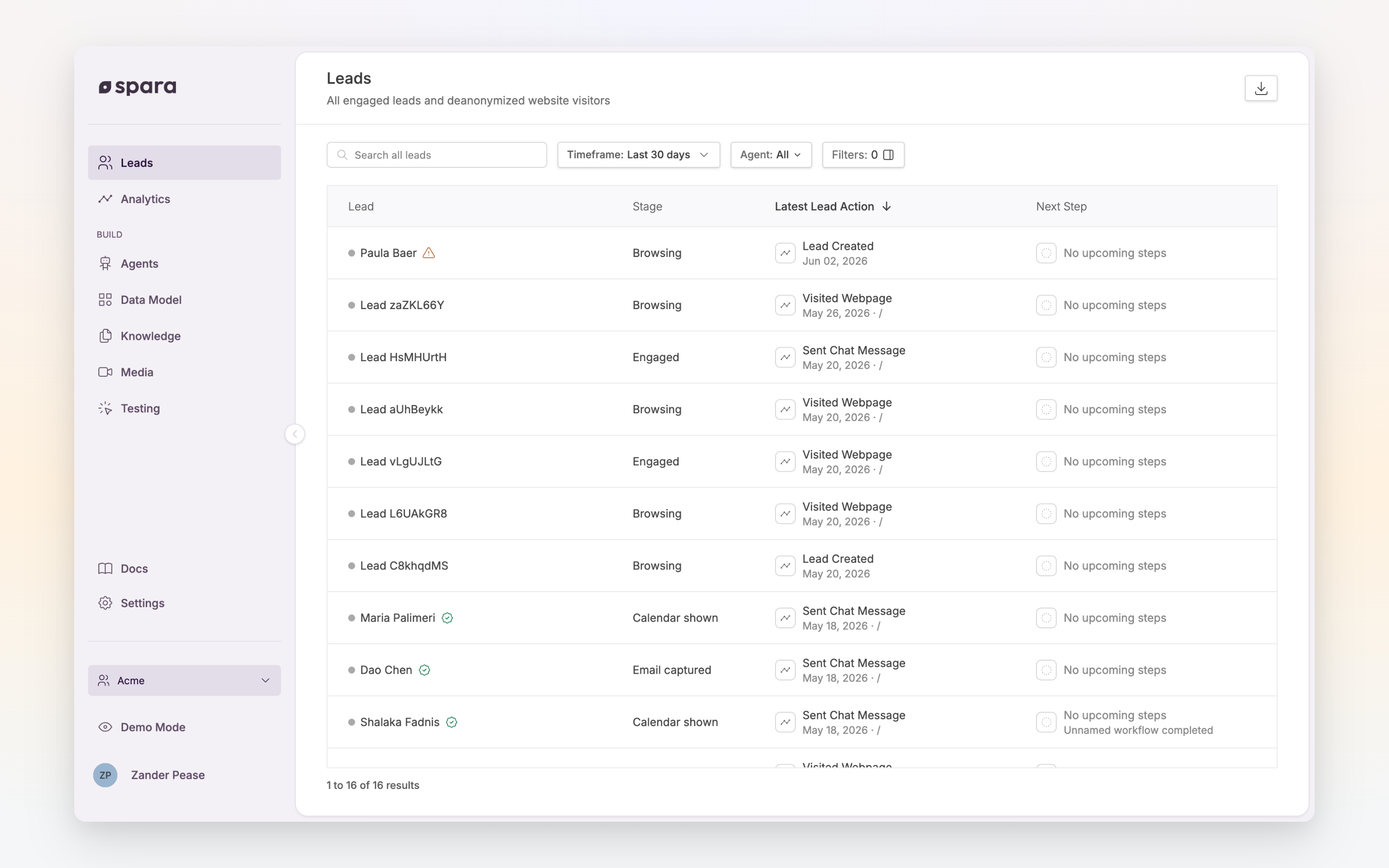
The Leads page distinguishes self-identified leads (green check) from deanonymized visitors (yellow warning).
## Enabling Vector
Your current provider and trigger mode are visible under **Settings > Signals** in the Spara platform. The settings are managed by Spara: your Spara point of contact enables Vector for your account and configures which trigger mode applies:
| Mode | When it runs | Notes |
| ----------------------- | --------------------------------------------------- | -------------------------------------------------------------- |
| Off | Never runs | |
| On engagement (default) | When a visitor sends at least one message in chat | Default for accounts with Vector enabled |
| All Site Traffic | On every page visit, regardless of chat interaction | Additional charge; coordinate with your Spara point of contact |
Once enabled, matched data flows into your lead records automatically. There is nothing to configure on your side.
Each account runs one deanonymization provider at a time. If your team cares more about account-level signals than individual identities, [Bombora (Deanonymization)](/integrations/signals/bombora.md) is the company-level alternative.
## Fields captured
When Vector resolves a visitor, Spara writes the match to dedicated deanonymization fields on the lead record. Keeping these separate from visitor-provided fields means a probabilistic match never overwrites information the lead gave you directly.
| Field | Description |
| --------------------------------- | ------------------------------------------------------- |
| Deanonymized First name | Contact's first name, when matched at the person level |
| Deanonymized Last name | Contact's last name, when matched at the person level |
| Deanonymized Email | Business email when available, otherwise personal email |
| Deanonymized Job title | Contact's current role |
| Deanonymized Department | Contact's functional area |
| Deanonymized LinkedIn URL | Contact's LinkedIn profile |
| Deanonymized Company name | Matched company |
| Deanonymized Company domain | Matched company's website domain |
| Deanonymized Company LinkedIn URL | Matched company's LinkedIn page |
| Deanonymized First visit at | Timestamp of the visitor's first tracked visit |
| Deanonymized Last visit at | Timestamp of the visitor's most recent tracked visit |
| Deanonymized Unique pages visited | Count of distinct pages the visitor has viewed |
Spara also captures the visitor's browsing journey from Vector, including first-touch UTM parameters (source, medium, campaign, content, term), page view history, and audience segment membership. This journey data is stored on the lead's deanonymization profile.
All fields follow the structure described in [Data Model](/build/data-model.md). Not every field is populated on every match; person-level fields are only present when Vector resolves the specific individual, not just their company.
## Match rates
Deanonymization is probabilistic. Expect:
* **Person-level matches** on roughly 15 to 30% of US-based traffic, depending on your visitor base and Vector's coverage of that audience.
* **Company-level matches** at a meaningfully higher rate, since corporate IPs and networks resolve to a company even when the individual can't be identified.
* **US-only coverage.** Vector is geofenced to the United States to comply with US privacy regulations. International visitors are not matched.
* **Email is rarely returned.** Vector's dataset does not reliably include email addresses. Collecting email through the conversation remains the most reliable path to email capture.
## Using the data
Because Vector's matches are written as lead fields, they work everywhere fields work:
* **Workflow enrollment**: reference deanonymized fields in [Workflows](/build/workflows.md) conditions, for example "Deanonymized Company domain is defined", to act on visitors from target accounts even if they never chat.
* **CRM syncing**: map deanonymized fields to CRM properties in your [CRM Integrations](/integrations/crm-integrations.md) settings.
* **Lead review**: the [**Leads**](https://app.spara.co/leads) page includes an Identification filter to segment self-identified leads from deanonymized ones.
For how deanonymized leads appear in the platform, including identity confidence icons, see [Deanonymization](/pipeline/leads/deanonymization.md).
## FAQ
### Do I need to change my website to use Vector?
No code changes are needed beyond the standard Spara snippet. However, Vector requires customers to update their Privacy Policy and Consent Management Platform (CMP) to disclose the use of third-party data partners. Confirm with your Spara point of contact if you have not already done so.
### Can Vector data overwrite what a lead told us in chat?
No. Vector's matches are written to dedicated deanonymized fields, separate from visitor-provided fields. Visitor-provided data always takes precedence in the lead's identity.
### Is Vector compliant with privacy regulations?
Vector uses privacy-safe data sources and does not rely on third-party cookies. Vector is SOC 2 Type 2, GDPR, and CCPA compliant.
---
# Agent Instructions
This documentation is published with GitBook. GitBook is the documentation platform designed so that both humans and AI agents can read, navigate, and reason over technical content effectively. Learn more at gitbook.com.
## Querying This Documentation
If you need additional information that is not directly available in this page, you can query the documentation dynamically by asking a question.
Perform an HTTP GET request on the current page URL with the `ask` query parameter, and the optional `goal` query parameter:
```
GET https://docs.spara.com/integrations/signals/vector.md?ask=&goal=
```
`ask` is the immediate question: it should be specific, self-contained, and written in natural language.
`goal` is optional and describes the broader end goal you are ultimately trying to accomplish on behalf of the user. GitBook uses it to tailor the answer towards what is most useful for that goal.
The response will contain a direct answer to the question and relevant excerpts and sources from the documentation.
Use this mechanism when the answer is not explicitly present in the current page, you need clarification or additional context, or you want to retrieve related documentation sections.