# Webhooks

The Spara platform offers powerful integration capabilities through both outbound webhooks and a [Web API](/developers/spara-api/web-api.md).

Webhooks provide real-time notifications of lead events via `POST` requests to a customer-defined endpoint, enabling automated workflows, external system synchronization, and timely responses to key updates. APIs allow customers to update and enrich lead data, manage user information, and influence the behavior of our AI engine - supporting deep, flexible integrations. All API interactions must be conducted over `HTTPS` to ensure secure communication.

Both webhooks and API support basic data types via JSON. These types are not explicitly identified in request values.

* `string`, ex. `"John Doe"`
* `integer`, ex. `100`
* `boolean`, i.e. `true` or `false`

Malformed values will be rejected, ex. `John Doe`. Take care to not cast integer or boolean values as strings, ex. `"100"`.

{% hint style="warning" %}
Important: Spara does not recommend using webhooks to update information also being updated by a native integration, as this may result in data conflicts or unexpected behavior.

For example, using information from webhooks to update Salesforce records in conjunction with Spara's native Salesforce integration.
{% endhint %}

### Schema

Spara models leads as a single object with any number of arbitrary fields. For example, if you configure Spara to ask your leads the question "What industry is your company in?" you may decide to name that field `industry`.

The following fields are standard for all leads:

```
# Info about the lead.
email(string)
company_name (string)
first_name (string)
last_name (string)
phone_number (string)
job_title (string)
num_employees (integer)
```

In addition, some leads may have an assigned sales rep in Salesforce:

```
# Info about Salesforce objects connected to the lead. All fields are strings.
sales_rep_name
salesforce_account_id- The unique identifier of the Salesforce account
salesforce_account_name - The name of the Salesforce account which usually represents the company name
salesforce_account_owner_email - The email address of the Salesforce account owner (account's default sales rep)
salesforce_account_owner_id - The unique identifier of the Salesforce account owner
salesforce_account_owner_name - The first & last names of the Salesforce account owner
salesforce_account_website - The website URL associated with the Salesforce account
salesforce_assigned_sales_rep_email - The email address of the lead's assigned sales rep
salesforce_assigned_sales_rep_id - The unique identifier of the lead's assigned sales rep
salesforce_assigned_sales_rep_name
```

### Webhook Registration & Events

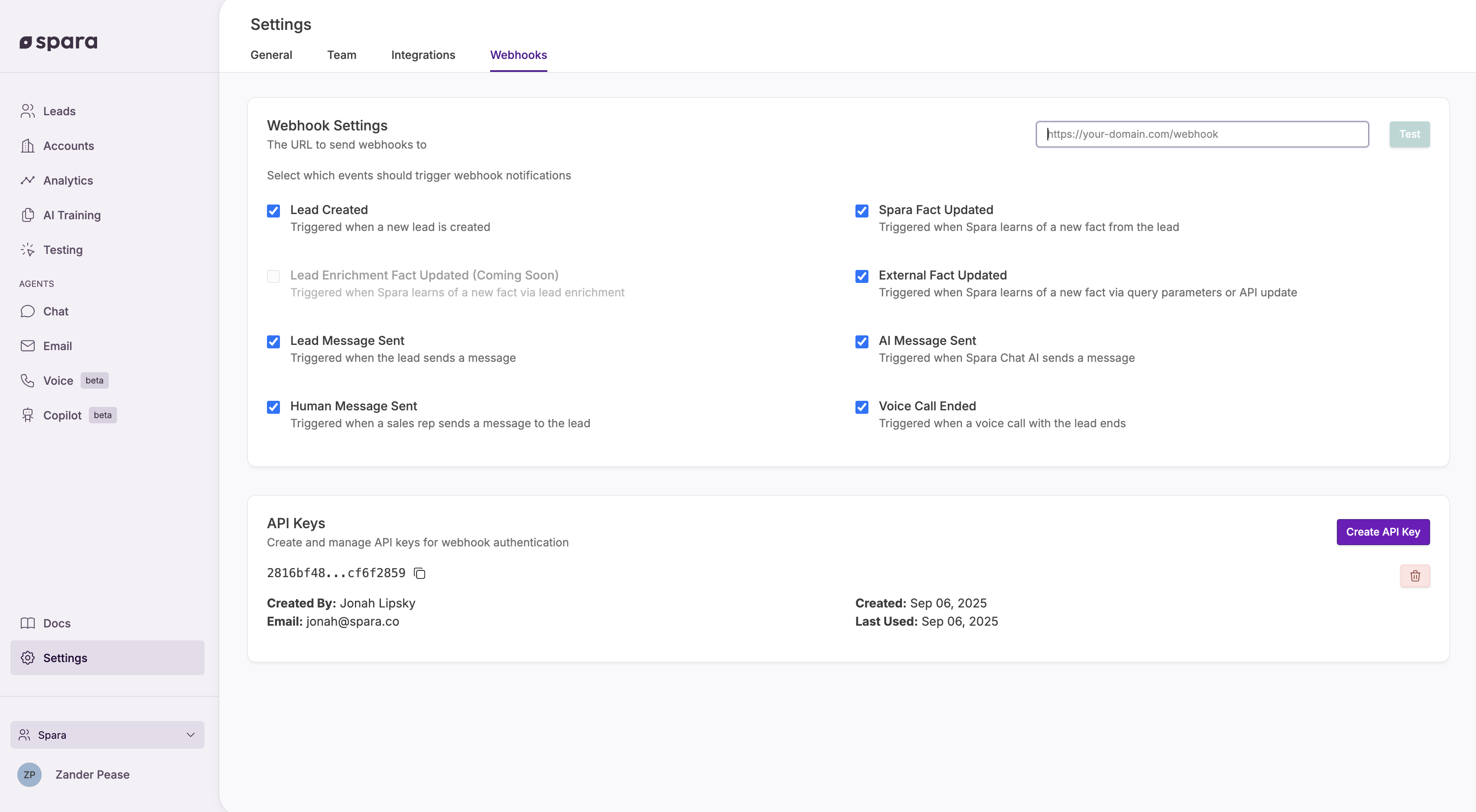
Each customer can register one webhook endpoint in the Settings > [Webhooks](https://app.spara.co/organization/webhooks) page.

The following information is required to register a webhook:<br>

* **Webhook URL**: A valid `HTTPS` endpoint where webhook payloads will be sent. Test payloads may be triggered by clicking the "Test" button.
* **API Key(s)**: Customers must create at least one API Key to enable outbound webhooks.
* **Events:** Select which events trigger webhook notifications.
  * See table below for all event types.
  * NB: If multiple events are triggered at the same time, they are grouped into a single webhook call.

<table data-full-width="true"><thead><tr><th>Event Name</th><th>When the webhook event is triggered</th><th>Example</th></tr></thead><tbody><tr><td><code>Lead Created</code></td><td>A new lead is created.</td><td></td></tr><tr><td><code>Spara Fact Updated</code></td><td>Spara learns a new fact from conversing with the lead.</td><td>A lead sends the message "My email is joe@test.com."</td></tr><tr><td><code>External Fact Updated</code></td><td>Spara learns of a new fact via query parameters or API.<br><br>NB: Will not trigger when a new lead is created if <code>Lead created</code> is not selected.</td><td></td></tr><tr><td><code>Lead Enrichment Fact Updated</code></td><td>Spara learns of a new fact via lead enrichment.</td><td></td></tr><tr><td><code>Lead Message Sent</code></td><td>The lead sends a message.</td><td></td></tr><tr><td><code>AI Message Sent</code></td><td>Spara Chat AI sends a message.</td><td></td></tr><tr><td><code>Human Message Sent</code></td><td>Human uses "Manual Mode" to send a message to the lead.</td><td></td></tr><tr><td><code>Voice Call Ended</code></td><td>A voice call with the lead ends. The payload includes call timestamps, the Voice agent that handled the call, a short summary, and the transcript.</td><td></td></tr></tbody></table>

<figure><img src="/files/DDU5IfN999gPXmdTzHzH" alt=""><figcaption></figcaption></figure>

### Differentiating voice, chat, and email events

Every webhook payload includes a `source` field describing which channel produced the event. Filter on this field to route events in your handler:

| Source  | Channel            |
| ------- | ------------------ |
| `voice` | Voice call         |
| `chat`  | Chat conversation  |
| `email` | Email conversation |

### Delivery Format

Each webhook is sent as a JSON payload in the body of an HTTP POST request. All known fields about a lead will be returned in each webhook event. The standard format is as follows:

```json
POST /your-endpoint
Content-Type: application/json
X-API-Key: <API Key>

// lead.created
{
  "event": "lead.created",
  "timestamp": "2025-09-18T18:48:08Z",
  "object": "lead",
  "id": "GTvcBRZd",
  "url": "https://app.spara.co/conversations/GTvcBRZd",
  "created_at": "2025-09-18T18:48:08Z",
  "updated_at": "2025-09-18T18:48:08Z",
  "data": {
    "ip_country": "US",
    "ip_region": "New York",
    "ip_city": "New York",
    "current_url": "https://www.my-site.co/chat/jJyVt7TQ5",
    "conversation_url": "https://app.spara.co/conversations/GTvcBRZd"
  },
  "conversation": {
    "created_at": "2025-09-18T18:48:08Z",
    "initial_url": "https://www.my-site.co/chat/jJyVt7TQ5",
    "device": "DESKTOP",  // most recent device used
    "initial_device": "DESKTOP",  // first device used
    "messages": []
  }
}

// lead.updated
{
  "event": "lead.updated",
  "timestamp": "2025-09-18T18:48:38Z",
  "object": "lead",
  "id": "GTvcBRZd",
  "url": "https://app.spara.co/conversations/GTvcBRZd",
  "created_at": "2025-09-18T18:48:08Z",
  "updated_at": "2025-09-18T18:48:38Z",
  "data": {
    "ip_country": "US",
    "ip_region": "New York",
    "ip_city": "New York",
    "current_url": "https://www.my-site.co/chat/jJyVt7TQ5",
    "conversation_url": "https://app.spara.co/conversations/GTvcBRZd",
    "first_name": "Jane"
  },
  "conversation": {
    "created_at": "2025-09-18T18:48:08Z",
    "initial_url": "http://localhost:5001/chat/jJyVt7TQ5",
    "device": "DESKTOP",  // most recent device used
    "initial_device": "DESKTOP",  // first device used
    "messages": [
      {
        "sent_by": "AI",
        "created_at": "2025-09-18T18:48:08Z",
        "text": "Hi, any questions I can help with?",
        "asset": "ACME Overview.mp4"
      },
      {
        "sent_by": "LEAD",
        "created_at": "2025-09-18T18:48:13Z",
        "text": "hi my name is Jane"
      },
      {
        "sent_by": "AI",
        "created_at": "2025-09-18T18:48:16Z",
        "text": "Hello! How can I assist you with Acme-Eng's services today?"
      },
      {
        "sent_by": "MANUAL",
        "created_at": "2025-09-18T18:48:38Z",
        "text": "Hi this is your sales rep. I am taking over the conversation."
      }
    ]
  }
}
```

### Security

To ensure secure transmission, all webhook payloads include the customer's oldest active API Keys in the `X-API-Key` header. Customers should verify the API Key before trusting the contents of the webhook.

Webhook URLs must use `HTTPS`. Plain `HTTP` endpoints will be rejected during registration.

### Retry Policy

If a webhook delivery fails (i.e., a non-2xx HTTP response or a timeout), our system will automatically retry the request using exponential backoff. Up to 2 retries (in addition to the original attempt) will be made. Customers are encouraged to design their endpoints to respond quickly and handle retries idempotently.

### Best Practices

* Validate the API Key of incoming webhook requests before processing.
* Respond to webhooks with a `200 OK` status as quickly as possible.
* Offload heavy processing to background jobs or message queues.
* Log and monitor webhook delivery attempts to aid in troubleshooting.


---

# Agent Instructions: Querying This Documentation

If you need additional information that is not directly available in this page, you can query the documentation dynamically by asking a question.

Perform an HTTP GET request on the current page URL with the `ask` query parameter:

```
GET https://docs.spara.com/developers/spara-api/webhooks.md?ask=<question>
```

The question should be specific, self-contained, and written in natural language.
The response will contain a direct answer to the question and relevant excerpts and sources from the documentation.

Use this mechanism when the answer is not explicitly present in the current page, you need clarification or additional context, or you want to retrieve related documentation sections.
